Buying a vSeeBox? Costs, Models & Questions

Thinking About Buying a vSeeBox?Start Here.
Get clear answers about TV compatibility, costs, model choices, and what to check
before you buy. Whether you're upgrading an older TV or comparing vSeeBox models,
this guide helps you decide what fits your home. Explore the Buying Questions Below.
Published by vSeeDirect, an authorized vSeeBox retailer serving the United States and Canada.
Thinking About Buying a vSeeBox?Start Here.
Get clear answers about TV compatibility, costs, model choices, and what to check
before you buy. Whether you're upgrading an older TV or comparing vSeeBox models,
this guide helps you decide what fits your home. Explore the Buying Questions Below.
Published by vSeeDirect, an authorized vSeeBox retailer serving the United States and Canada.

Start Here: Will vSeeBox Work for You?

Q: What is a vSeeBox, and how does it work?

A: vSeeBox is a range of Android-based TV boxes that connect to a compatible television through HDMI. The box provides an interface for compatible entertainment apps, with storage, remote controls, and other features that vary by model.
 
For online viewing, you’ll need power, an internet connection, and access to the apps or services you want to use.
 
Select the matching HDMI input on your television and follow the on-screen instructions. App sign-in or additional setup may be required.

Q: Will vSeeBox work with my older TV?

A: If your TV has a compatible HDMI input. Your television does not need to be a smart TV.
Check the connections on the back or side of your television. 

Q: Do I need vSeeBox if I already have a smart TV?

A: That depends on what you want to add. A separate TV box gives you its own interface, storage, and remote, along with model-specific features.​
For example, V6 Max includes 64GB storage and a backlit voice remote. Check whether your preferred apps and features are compatible before deciding.

Q: Do I need to buy a new television?

A: If your current TV has a compatible HDMI input and still meets your viewing needs.
You can add a vSeeBox while keeping your existing screen. The box does not change the television’s physical display resolution.
Before ordering a replacement, confirm compatibility with your exact vSeeBox model.

Understand the Costs and Viewing Options

Q: Does vSeeBox require a monthly subscription?

A: The vSeeBox device itself does not require a recurring subscription. Optional paid apps and third-party services may charge separately.
Your home internet service is also a separate expense.

Q: Can I install additional apps on vSeeBox?

A: You can install apps that are compatible with your device. Availability and supported features depend on the app provider and your model.
 
Use the provider’s supported installation method. Do not assume every Android app will work on a television interface or with a remote.

Q: Can I cancel my cable service after buying a vSeeBox?

A: That depends on the programs and services your household needs. Check your preferred viewing options before changing your cable package.
 
If your internet and television services are bundled, ask your provider how cancellation would affect your internet price.

Q: Do I need a VPN to use vSeeBox?

A: A VPN is not a basic requirement for connecting the box to your TV and home internet.

Individual apps and services have their own access requirements. A VPN does not include subscriptions or guarantee access to a particular service.

Q: Does vSeeBox support subtitles and other languages?

A: Supported content may offer subtitles, closed captions, or multiple audio tracks. Options depend on the app and the individual program.
 
If a specific language or accessibility feature is important to you, check its availability before ordering.

Q: Is catch-up playback the same as recording a show?

A: Catch-up playback lets you revisit programs made available by a supported service. It does not mean you can record any program and keep it permanently.

Availability and the playback period vary. Check the app’s program guide for supported options.

Choose the Model That Fits Your Needs

Q: What should I compare when choosing a vSeeBox?

A:Start with the features you’ll use: remote type, storage, wired networking, and split-screen support.
 
More storage provides additional room for compatible apps and their data. It does not automatically improve every video or service.
 
Select the matching HDMI input on your television and follow the on-screen instructions. App sign-in or additional setup may be required.

Q: Who should consider vSeeBox V6 Max?

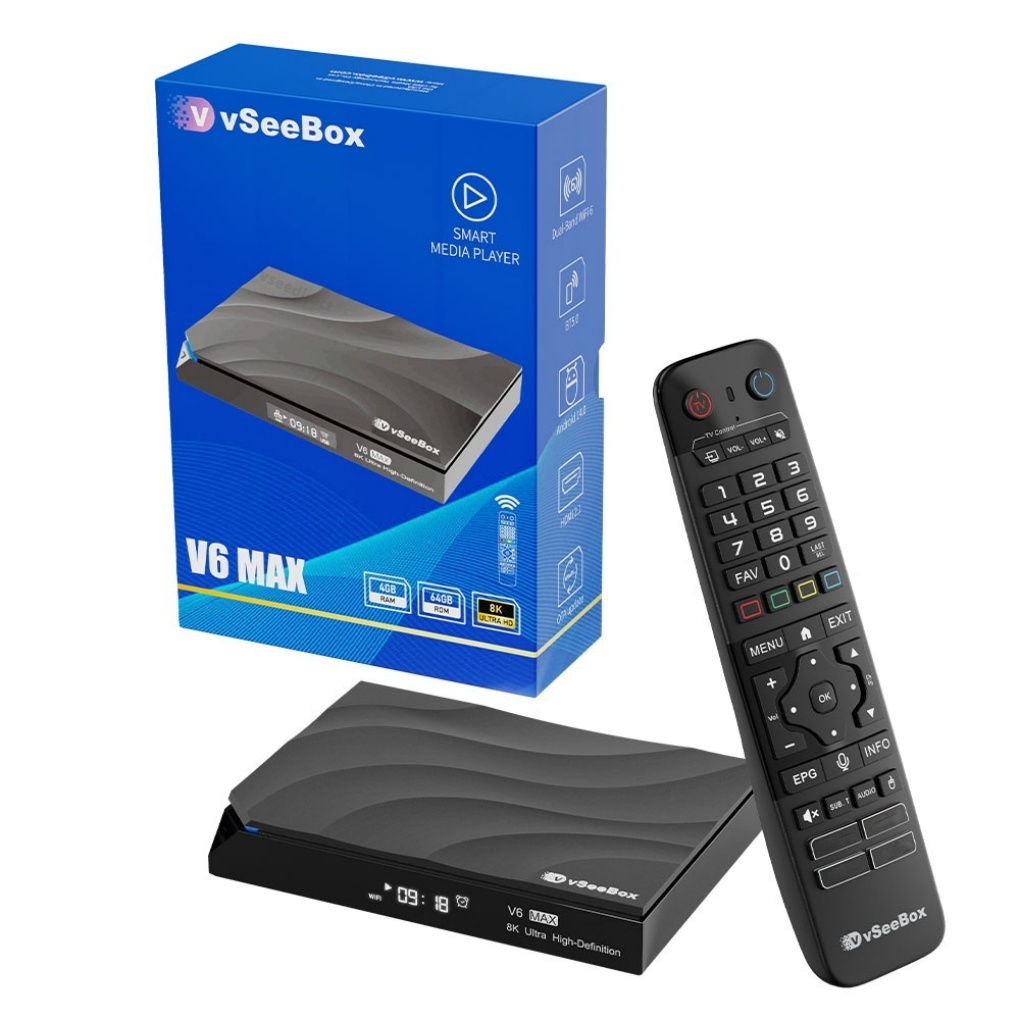
A: V6 Max is a practical choice if you want Android 14, 4GB RAM, 64GB storage, Wi-Fi 6, and a backlit voice remote. shop now
 
Consider it if illuminated remote buttons and 64GB storage matter to you, and you do not need split-screen viewing.

Q: What is the difference between V6 Max and V6 Pro?

A: Both models have Android 14 and 4GB RAM.
 
V6 Max has 64GB storage and a backlit voice remote. V6 Pro has 32GB storage and a voice remote without backlighting. shop now
 
For wired networking, V6 Pro has Gigabit Ethernet, while V6 Max has a 100 Mbps Ethernet port. shop now

Q: What is the difference between V6 Max and V6 Plus?

A: Both models offer Android 14, 4GB RAM, 64GB storage, and a backlit voice remote.
 
V6 Plus supports split-screen viewing. V6 Max does not. Compare current prices and the full product details before choosing.

Getting Started at Home

Q: Is vSeeBox difficult to set up?

A: Basic setup involves connecting the box to your TV through HDMI, plugging in the power, and connecting to the internet.
 
Select the matching HDMI input on your television and follow the on-screen instructions. App sign-in or additional setup may be required.

Q: What internet speed do I need?

A: The speed you need depends on the app, video quality, and other devices using your connection.

Check your chosen service’s recommendations and test the connection near your television. A fast internet plan does not guarantee strong Wi-Fi coverage in every room.

Q: Do I need a VPN to use vSeeBox?

A: 

A VPN is not a basic requirement for connecting the box to your TV and home internet.

Individual apps and services have their own access requirements. A VPN does not include subscriptions or guarantee access to a particular service.

Q: Can I use a different remote with vSeeBox?

A: Some replacement remotes may provide basic controls, but voice search and other functions may require a remote designed for your model.
 
Before ordering a replacement, confirm compatibility with your exact vSeeBox model.

Q: Can I connect a mini wireless keyboard?

A: A compatible USB wireless keyboard can make typing and searching easier. Keyboards with a USB receiver connect through an available USB port on the box.
 
Check the selected package to see whether a keyboard is included.
 
Select the matching HDMI input on your television and follow the on-screen instructions. App sign-in or additional setup may be required.

Q: Do I need Wi-Fi, or can I use an Ethernet cable?

A: V6 Max supports both Wi-Fi and Ethernet. Choose the connection that works best for your home setup.
 
An Ethernet connection can help when Wi-Fi coverage near the television is weak. It cannot fix problems with the internet provider or the streaming service itself.

Q: What if I need help after setup?

A: For connection steps, everyday controls, and troubleshooting, visit our setup and support FAQs.
 
You can also email support@vseedirect.com. Include your model, order number if available, and a short description of the problem. Photos or a short video can help us understand what’s happening.

Buying with Confidence

Q: Where can I buy vSeeBox in the United States or Canada?

A: You can order online from vSeeDirect, an authorized vSeeBox retailer serving North America.

Review the model, selected package, current price, and shipping information before completing checkout.

Q: How can I check vSeeDirect’s authorization?

A: Use authorization code VAD255811 on the vSeeBox authorization verification page.
 
Confirm that the dealer details match our certificate and vseedirect.com. Keep your order confirmation or invoice for future support.

Q: Where can I check returns and warranty information?

A: Review our return policy and the warranty information for your selected product before ordering.
 
If you need clarification about eligibility, conditions, or the process, contact support@vseedirect.com before making your purchase.

Q: What should I send if I need technical help?

A: Include your model, order number if available, the app or feature affected, and a short description of what happens.
 
A clear photo or short video can help us understand the issue. Send device identifiers privately if our support team requests them.

Cart

loading