


The game is about to start. You’ve got your seat, your snacks, and the TV is on — but now you’re scrolling through channels trying to figure out where the game is.
That’s where vSeeBox can make things easier. On compatible models, apps like Heat Live let you browse available live TV, check the program guide, search for sports content, and play back when available.
This guide shows you the simplest way to find live sports on vSeeBox, what to try if an event doesn’t show up right away, and how to catch up if you tune in late.
 Can You Stream Live Sports on vSeeBox?
Yes. vSeeBox can be used to access live sports programming through supported apps and available services.
Depending on your device, app version, location, schedule, and service availability, you may find football, basketball, baseball, hockey, soccer, tennis, golf, motorsports, combat sports, and other sporting events throughout the year.
Available programming can change from day to day, so the easiest way to see what is currently available is to check the live TV app and program guide on your device.
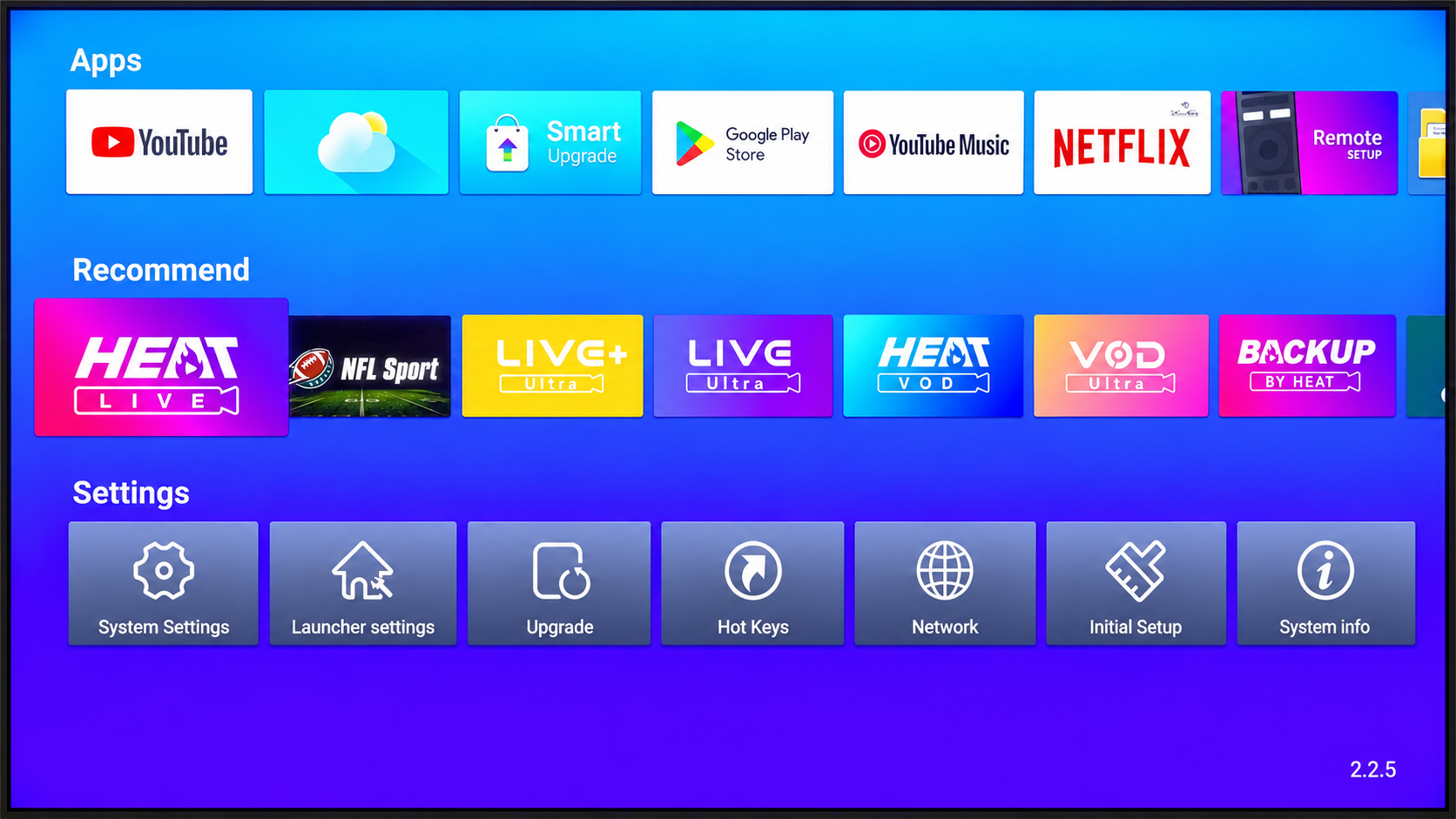 Find Live Sports with Heat Live
On compatible vSeeBox models, Heat Live can be used to browse available live TV programming, including sports-related content.
Getting started is simple.
1. Open Heat Live.
If Heat Live is available on your vSeeBox, open it from the home screen.
2. Browse the channel guide or categories.
Look through the available channels and categories to find sports programming.
Depending on the app version, you may also be able to use search instead of scrolling through the full channel list.
3. Check the EPG or program guide.
If an Electronic Program Guide is available, use it to see what is playing now and what is scheduled later.
This is especially useful when you want to know whether an event has already started or is coming up soon.
4. Select an available channel.
Open the channel you want to check. If the programming is available and the stream is working normally, playback should begin.
The experience is similar to using a traditional TV guide, except the programming is accessed through an app on your vSeeBox.
Can’t Find the Game? Try These Options
If you do not see the event where you first expected it, do not assume it is unavailable right away.
Try a few simple steps:
- Check other available sports-related programming in the guide.
- Use search if your app version supports it.
- Browse available local programming.
- Check the EPG again to confirm the scheduled time.
- Exit and reopen the app or channel.
Some sporting events may appear through more than one available source, so checking the guide carefully can help.
This is especially useful on busy sports days when several events may be happening at the same time.
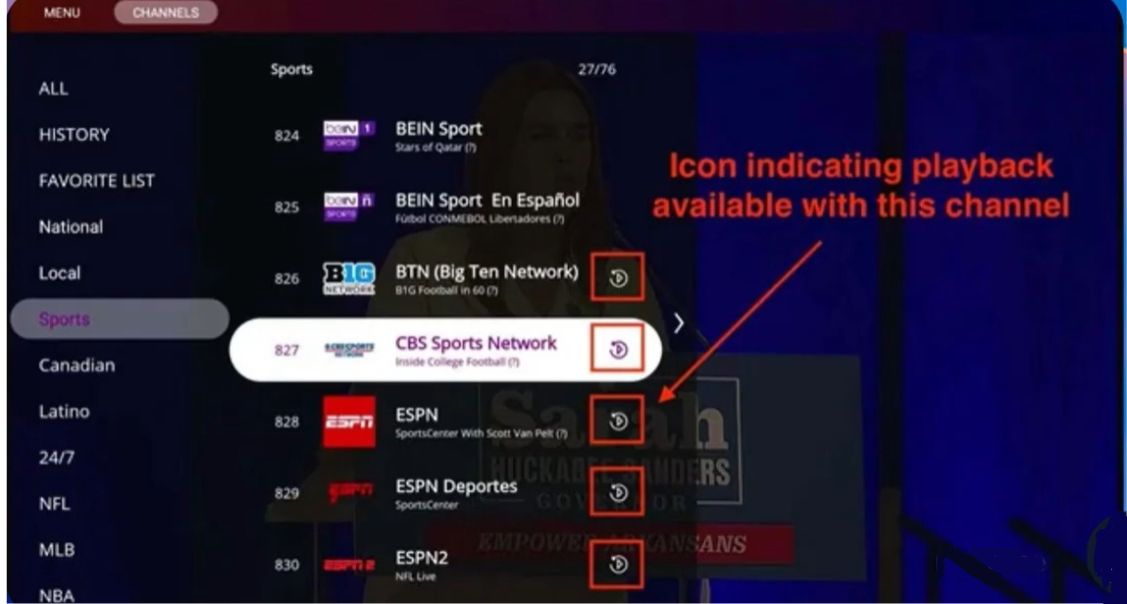 Joined Late? Use Playback
Missed the beginning of a game? Some channels in Heat Live support Playback, which lets you watch previously aired programming.
Here’s how to use it:
1. Open Heat Live and find the channel you want.
Look for the Playback icon next to the channel name. This icon indicates that playback is available for that channel.
2. Open the program guide.
Select the channel and open its EPG or program guide.
3. Browse earlier programs.
Use the guide to move through earlier times or available dates and find the program you missed.
4. Select the program to start playback.
Choose the earlier program you want to watch and start playback.
Playback availability can vary by channel and program, so check for the Playback icon first.
Why Does a Sports Channel Say “Under Maintenance”?
You may occasionally open a sports or event channel and see a “Channel Under Maintenance” message.
This does not always mean there is something wrong with your vSeeBox.
Some event channels may not have live programming available at that moment. In other cases, a channel may be temporarily unavailable or undergoing a technical check.
If this happens:
- Check the EPG or schedule.
- Exit the channel and open it again.
- Try another available channel.
- Check whether other channels are working normally.
If only one channel is affected, the issue may be limited to that channel rather than your device.
Reduce Buffering During Live Sports
Live sports can be more sensitive to internet quality because the content is playing in real time.
If the stream freezes or buffers, try these steps:
- Use a stable internet connection.
- Keep your vSeeBox reasonably close to your Wi-Fi router.
- Avoid large downloads on the same network during the event.
- Restart the app if the stream stops responding.
- Restart the vSeeBox if several channels are having problems.
If buffering happens frequently, checking your internet connection is usually a good first step.
What Sports Can You Find?
Sports availability changes throughout the year.
Depending on the apps and services available on your device, you may find:
- Football
- Basketball
- Baseball
- Hockey
- Soccer
- Tennis
- Golf
- Motorsports
- Combat sports
- Other live sporting events
Instead of searching for each sport separately, the quickest approach is usually to open the program guide and see what is available that day.
A Good vSeeBox Choice for Sports Fans
If you want a vSeeBox for live sports and everyday entertainment, the vSeeBox V6 Max is a strong option to consider.
It offers:
• 4GB RAM and 64GB storage
• Android 14
• Wi-Fi 6
• HDMI 2.1
• Backlit voice remote
For sports fans, the combination of stable connectivity, smooth everyday performance, and a backlit remote can make it easier to navigate live TV and sports content, especially in the evening.
If you want a balanced model without paying for features you may not need, the V6 Max is a practical choice.
PS: Shop the vSeeBox V6 Max and save with code vseebox28.